
Chasing Fire: How to Predict Spectacular Sunrises and Sunsets
Learn to read atmospheric signals for dramatic red and golden skies. Understand what creates fiery sunsets, how aerosol data enhances predictions, and why single-point forecasts fail.
Chasing Fire: How to Predict Spectacular Sunrises and Sunsets
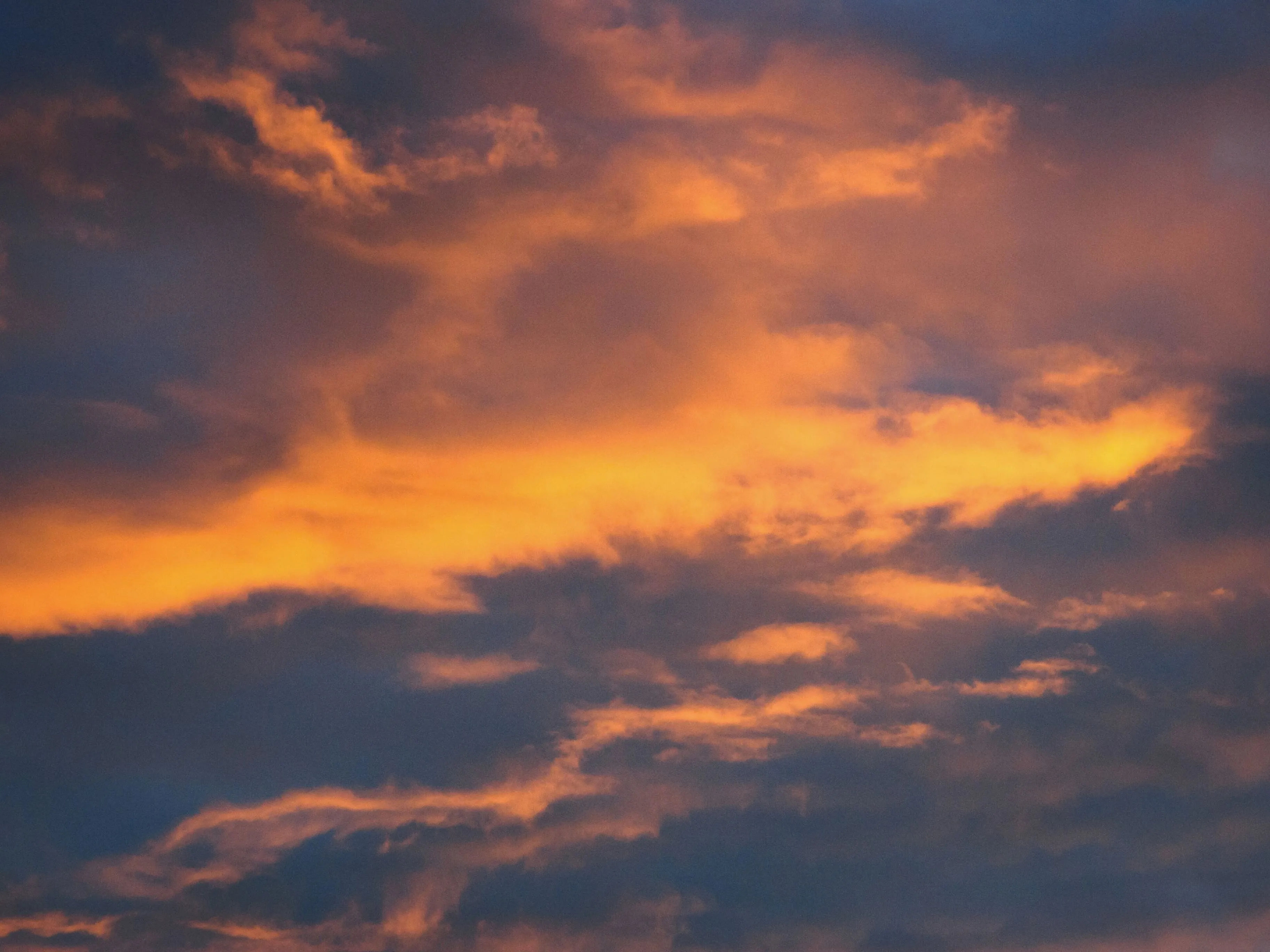
You’ve seen those photos. The sky exploding in impossible shades of red, orange, and magenta. Clouds lit up like they’re on fire. The kind of sunset that makes everyone stop what they’re doing and stare.
Then you try to catch one yourself. You check the forecast: “partly cloudy.” You drive out to your favorite viewpoint. And you get… grey. Flat light. Nothing.
The problem isn’t bad luck. It’s that predicting dramatic sunrises and sunsets requires understanding atmospheric physics that standard weather forecasts don’t capture. The right clouds in the wrong place give you nothing. The wrong aerosols turn potential fire into muddy haze. And timing matters down to the degree of solar elevation.
This guide explains what actually creates those fiery skies, how PhotoWeather predicts them, and how to set up alerts so you never miss another spectacular sunset.
You’ll need a free PhotoWeather account to follow along with the examples. Pro features are noted where applicable.
Why Most Sunset Forecasts Fail
Standard weather apps tell you one thing: cloud coverage as a percentage. Maybe 40% clouds. Is that good for a sunset? Bad? The answer is: it depends entirely on factors the forecast doesn’t show you.
The Single-Point Problem
Traditional weather forecasts sample conditions at one GPS coordinate, directly above you. But sunset photography doesn’t care what’s overhead. It cares about what’s happening at the horizon in two specific directions:
Solar horizon: Where the sun is setting (or rising). This needs to be relatively clear. Low clouds here block the sun’s light from penetrating the atmosphere. No penetration, no color.
Antisolar horizon: The opposite direction from the sun. This is where you want clouds. High and mid-level clouds positioned here catch the red light streaming across the sky and reflect it back at you. No clouds here, no drama.
A forecast that says “40% clouds” tells you nothing about whether those clouds are in the right place. They could all be at the solar horizon (bad), all at the antisolar horizon (potentially excellent), or scattered randomly overhead (mediocre).
This is why “partly cloudy” sunsets are a coin flip.
The Aerosol Problem
The second issue is particle composition. What makes sunsets red in the first place?
As sunlight travels through more atmosphere at low angles, shorter wavelengths (blue, green) scatter away, leaving longer wavelengths (red, orange) to reach your eyes. The intensity of this effect depends heavily on what’s floating in the air.
- Moderate aerosol loading (dust, sea salt, pollen) enhances red light scattering. This is why sunsets after dust events or volcanic eruptions can be exceptionally vivid.
- Smoke particles do the opposite. Wildfire smoke creates grey and brown haze that muddles colors and reduces contrast.
- Very clean air produces pleasant but muted sunsets. Good, not spectacular.
Standard forecasts don’t include aerosol data. They can’t distinguish between “hazy conditions that will enhance colors” and “hazy conditions that will ruin them.”
What Creates Fiery Red Skies
Understanding the physics helps you read the signals. A spectacular sunset needs several factors aligned:
1. Clear Solar Horizon
The sun’s light must reach you unblocked. Low clouds at the horizon act like a curtain, cutting off the light source. This is the single biggest killer of potentially dramatic sunsets.
What you’re looking for:
- Low cloud cover (below 2 km) under 30% in the direction of the sun
- Good visibility (8-25 km is optimal, some haze enhances scattering)
- No significant precipitation between you and the setting sun
2. Clouds to Catch the Light
Once sunlight penetrates, it needs something to illuminate. The best targets are:
Mid-level clouds (2-7 km altitude): These catch light beautifully and create the most dramatic texture. 20-60% coverage in the antisolar direction is optimal.
High-level clouds (above 7 km): Cirrus and high stratus add depth and catch the first (and last) color. 30-70% coverage enhances rather than blocks.
Multi-layer structure: The most dramatic sunsets feature clouds at multiple altitudes, creating depth and complexity.
3. Optimal Aerosol Conditions
This is where Pro-tier analysis really shines. PhotoWeather incorporates satellite-based aerosol data to assess what’s actually floating in the atmosphere:
Particle density: A moderate amount of particles in the air enhances red light scattering. Too clean and sunsets are pleasant but muted. Too hazy and colors wash out.
Dust vs Smoke: Dust particles (larger, coarser) scatter warm wavelengths preferentially, creating richer reds and oranges. Smoke particles (smaller, finer) create grey/brown haze that degrades colors. PhotoWeather can distinguish between them.
Particle size: Coarser particles (like dust and sea salt) correlate with warmer, more vivid sunset colors. Finer particles (like smoke and pollution) predict muted, greyish results.
4. The Critical Timing Window
Solar elevation matters enormously. The optimal window is narrow:
- -6 to +2 degrees solar elevation: This is the fire zone. Sun is near or just below the horizon, light travels through maximum atmosphere, colors peak.
- Above +8 degrees: Too high. Light path too short for dramatic color.
- Below -10 degrees: Too dark. Insufficient light to illuminate clouds.
PhotoWeather applies these timing windows automatically. Scores drop to zero outside the optimal window regardless of how good other conditions look.
The Three Numbers That Matter
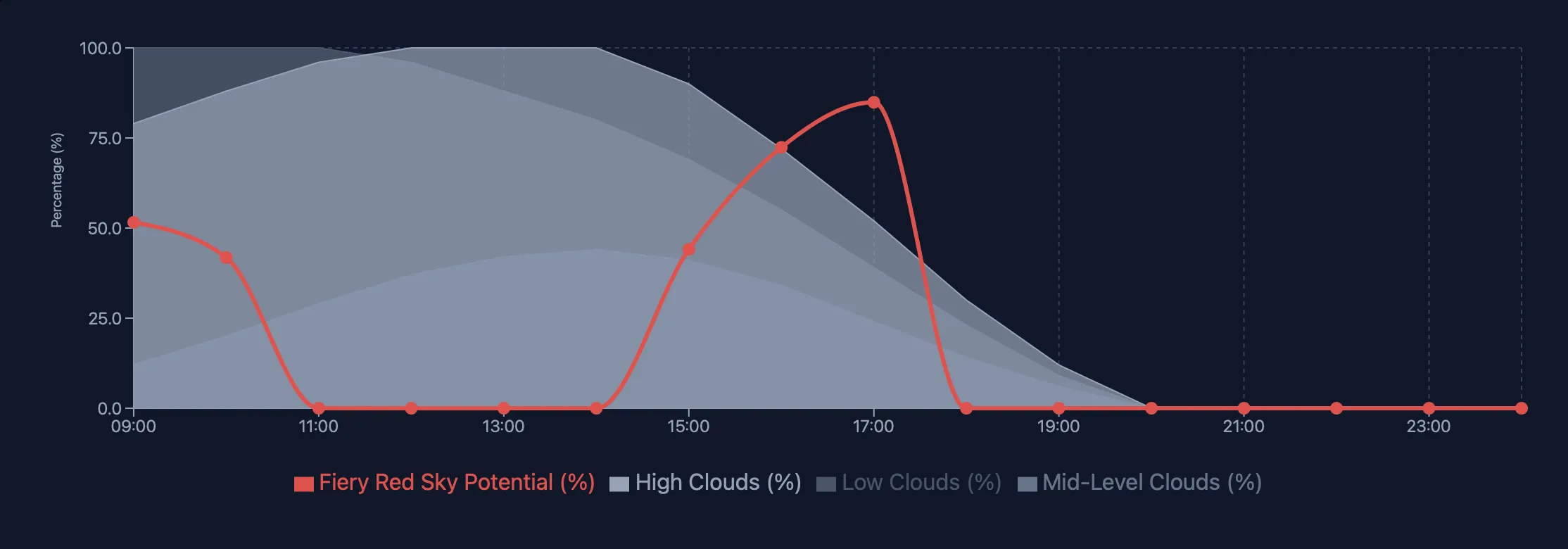
When analyzing sunset potential in PhotoWeather, focus on these core metrics:
1. Fiery Red Sky Potential (0-100%)
This is the comprehensive score that factors in everything: cloud positioning, particle conditions, humidity, pressure, stability, and solar elevation. Available at Pro tier, it incorporates satellite aerosol data for particle-aware predictions.
How to read it:
- 90-100%: Exceptional. Drop everything and go.
- 70-89%: Excellent. Strong probability of dramatic conditions.
- 55-69%: Good. Favorable conditions, worth shooting.
- 40-54%: Moderate. Possible color, but don’t drive far.
- Below 40%: Unlikely to be special.
2. Golden Hour Potential (0-100%)
Focuses on the warm, directional light quality rather than dramatic color. Uses cloud cover, visibility, and atmospheric clarity to score shooting conditions during golden hour periods.
How to read it:
- 85-100%: Perfect golden light conditions
- 70-84%: Excellent, ideal for portraits and landscapes
- 50-69%: Good, pleasant warm light
- Below 50%: Suboptimal conditions
3. Cloud Positioning (Multi-Layer Analysis)
Even without the composite scores, you can read the underlying cloud data:
- Cloud Cover Low: Want this low (under 30%) at solar horizon
- Cloud Cover Mid: 20-60% is optimal
- Cloud Cover High: 30-70% adds enhancement
Combined with wind speed (calm maintains atmospheric layers) and visibility (8-25 km optimal for enhanced scattering).
Reading Conditions in PhotoWeather
To analyze sunset potential:
- Open Weather Chart for your location
- Enable these fields:
- Fiery Red Sky Potential (Pro) or Golden Hour Potential
- Navigate to the sunset window (evening hours around astronomical golden hour)
- Look for peaks above 70%
Pro users see the full Fiery Red Sky Potential overlay, incorporating satellite aerosol analysis and Directional Weather Intelligence for horizon-aware predictions.
Directional Weather Intelligence (Pro)
This is what makes PhotoWeather fundamentally different. Instead of sampling weather at one point, Pro accounts sample conditions at multiple points in every direction around your location.
How It Works
For each forecast hour, PhotoWeather calculates where the sun is and divides the sky into zones:
Solar zone (toward the sun): Needs clear low horizon, good visibility, mid clouds above. This is the critical constraint because the sun’s light must penetrate.
Antisolar zone (opposite the sun): Wants high and mid clouds to catch light, good humidity for color saturation. This is what creates the drama.
Why It Matters
A single-point forecast might show “40% cloud cover.” Directional intelligence tells you whether those clouds are at the solar horizon (blocking, bad), the antisolar horizon (catching light, excellent), or scattered randomly (mediocre).
This is the difference between “might be a nice sunset” and “the conditions are specifically aligned for a fiery sky.”
Real example: Your location shows 45% total cloud cover. A standard forecast says “partly cloudy sunset.” But directional analysis reveals:
- Solar horizon: 15% low clouds, clear path for sun
- Antisolar horizon: 60% mid/high clouds, perfectly positioned to catch light
That’s not a maybe. That’s a go.
Setting Up Automated Alerts
Instead of checking forecasts obsessively, let PhotoWeather watch for you.
Fire Sky Template
The built-in “Fire Sky” template monitors all the right factors. It triggers when conditions align for potentially spectacular sunsets.
Setup:
- Go to Rules -> Add Rule -> Templates -> Fire Sky
- Review the default conditions:
- Golden hour period: any
- Fiery Red Sky Potential: >= 90%
- Precipitation probability: <= 15%
- Visibility: >= 8000m
- Enable for your locations
Tuning the Template
The template includes a sensitivity slider. Adjust based on how selective you want to be:
- Loose (80%): More alerts, includes good sunsets
- Default (90%): Balanced, catches excellent conditions
- Strict (95%): Fewer alerts, only exceptional opportunities
You can also create variants:
Morning Fire (sunrise focus):
- Duplicate the Fire Sky template
- Add time window: relative to sunrise, -30 to +45 minutes
- Optionally lower threshold to 85% (morning conditions often score slightly lower)
Golden Clouds (cloud-focused):
- Use the “Painted Sky” template instead
- Triggers on Golden Clouds Potential >= 80%
- Better for dramatic cloud formations vs pure color intensity
Testing Your Rules
When adjusting thresholds, use “Test against recent data” in the rule builder. This shows when your rule would have triggered over recent weeks.
What to look for:
- If you’ve had known spectacular sunsets, did the rule catch them?
- Are you getting too many false positives (alerts that didn’t pan out)?
- Is the threshold so strict you’re missing good opportunities?
Adjust based on your local patterns. Some regions (desert Southwest, coastal areas) produce more consistently dramatic sunsets than others. Calibrate your thresholds to local reality.
A Practical Timeline
Day before: Check the extended forecast for promising windows. Look for patterns: incoming fronts often produce dramatic sunsets as they approach or clear.
Morning of: Review the overnight forecast updates. Aerosol conditions update daily. Cloud patterns solidify closer to the event.
2-3 hours before sunset: Final go/no-go decision. Fiery Red Sky Potential should be clearly elevated. Check actual sky conditions, forecasts aren’t perfect.
During golden hour: Arrive 30-45 minutes before peak color. The show can start early and end quickly. Position yourself with clear sightlines to both horizons if possible.
After the sun sets: Stay for the afterglow. Some of the most dramatic color happens 10-20 minutes after the sun disappears, as high clouds catch the last light.
Field Techniques
Location Scouting
- Elevation helps: Higher viewpoints see more horizon and catch color earlier
- Water reflections: Lakes, rivers, and wet surfaces double your composition options
- Foreground interest: Silhouettes, leading lines, and frames make sunsets photography instead of snapshots
- Avoid obstructions: Buildings, trees, and terrain features blocking the horizon limit your window
Camera Settings
- Start at f/8-f/11: Good depth of field, sharpness across the frame
- ISO 100-400: Keep noise low, you have plenty of light initially
- Bracket exposures: Dynamic range is extreme during sunset. Bracket 2-3 stops for blending
- Underexpose slightly: Protects highlights, saturates colors, detail recoverable in shadows
Adapting When Conditions Aren’t Perfect
Clouds at solar horizon: Shift focus to silhouettes and dramatic shapes rather than color. The clouds themselves become the subject.
Too few clouds: Look for other elements: reflections, atmospheric haze, bird silhouettes, sun rays through gaps.
Smoke haze: Adjust white balance cooler to counteract orange/brown cast. Consider B&W conversion.
Wind killing atmosphere: Shoot faster, focus on moment rather than layers. Wind can create interesting cloud movement for longer exposures.
Quick Reference
Fiery Red Sky Thresholds
- Solar elevation: -6 to +2 degrees optimal
- Low clouds: Under 30% at solar horizon
- Mid clouds: 20-60% for texture
- High clouds: 30-70% for depth
- Particle conditions: Moderate haze with dust preferred over smoke (Pro)
- Visibility: 8-25 km for enhanced scattering
Alert Thresholds
- Exceptional: Fiery Red Sky Potential >= 90%
- Excellent: >= 75%
- Good: >= 60%
Template Options
| Template | Focus | Best For |
|---|---|---|
| Fire Sky | Color intensity | Dramatic red/orange skies |
| Painted Sky | Cloud drama | Golden-lit cloud formations |
| Golden Hour | Light quality | Warm, directional light |
| Golden Glow | Portrait light | Soft, flattering golden hour |
Frequently Asked Questions
What makes PhotoWeather better than checking a weather app?
Three things: (1) Composite scores that combine multiple factors into simple, actionable numbers, (2) Satellite aerosol data that predicts color quality not just cloud coverage, and (3) Directional Weather Intelligence that understands horizon conditions, not just overhead weather.
Do I need Pro to predict sunsets?
No. Free accounts access Golden Hour Potential and cloud layer forecasts. Pro adds Fiery Red Sky Potential with aerosol analysis and Directional Weather Intelligence for horizon-aware predictions. Pro dramatically improves accuracy for those “should I drive an hour for this?” decisions.
Why did my rule trigger but the sunset was mediocre?
Forecasts aren’t perfect, especially at forecast distances beyond 24 hours. Also check whether conditions changed after the forecast updated, sometimes fronts move faster or slower than predicted. If you have email notifications enabled we’ll notify you if the forecast changes significantly.
How far in advance can I trust sunset forecasts?
- Same day: High confidence, especially within 6 hours
- 1-2 days: Good reliability for pattern recognition
- 3-5 days: Use for planning, confirm closer to event
- Beyond 5 days: Directional only, conditions will change
What’s the difference between Fiery Red Sky and Golden Hour Potential?
Golden Hour Potential scores overall light quality (warm, directional, good for any subject). Fiery Red Sky Potential specifically targets dramatic color intensity, factors in aerosol conditions, and optimizes for sky-focused photography.
Get Started with PhotoWeather
Ready to catch spectacular sunrises and sunsets? We have several templates designed for golden hour photography:
- Golden Hour template - Monitors overall light quality for warm, directional shooting conditions
- Painted Sky template - Catches dramatic golden-lit cloud formations
- Fire Sky template - Alerts when atmospheric conditions align for fiery red and orange skies
Each template monitors cloud positioning, atmospheric clarity, and timing to catch those spectacular moments when the sky lights up.
Getting Started
- Create your free account
- Add locations where you shoot sunsets
- Add the Golden Hour template to your locations
- Adjust the sensitivity slider based on how selective you want alerts to be
- Test against recent data to calibrate to your local conditions
Ready for Pro-Level Predictions?
Free accounts provide solid sunset forecasting with Golden Hour Potential and cloud analysis. For serious sunset chasers, Pro unlocks:
- Fiery Red Sky Potential: Full aerosol-aware scoring with satellite particle data
- Directional Weather Intelligence: Multi-point horizon sampling for true position-aware predictions
- Hourly forecast updates: React to changing conditions
- 14-day planning horizon: Schedule shoots further in advance
- 15 locations, 100 rules: Cover all your favorite viewpoints
Upgrade to Pro and never miss another fiery sky.
Just Want to Try It Out?
Not ready for Pro? That’s fine. Sign up free and start with the Golden Hour Potential template. You’ll immediately get more actionable sunset forecasts than any standard weather app provides.
When you catch your first alert-driven spectacular sunset, you’ll know whether the Pro upgrade makes sense for your shooting style.
Happy chasing, Pontus