
PhotoWeather for iOS: Native Weather Alerts for Photographers
PhotoWeather launches on iOS with native push notifications, full rule management, and opportunity tracking. Android also available on Google Play.

PhotoWeather for iOS: Native Weather Alerts for Photographers
PhotoWeather is now available as a native iOS app. Get instant push notifications when perfect shooting conditions align, manage your rules on the go, and track photography opportunities—all with the performance and reliability of a native mobile application.
Why Go Native
Instant Push Notifications
Get alerted the moment conditions match your rules, even when the app isn’t open. Fog forming at sunrise? Aurora activity picking up? Your phone notifies you instantly so you can grab your gear and head out.
Native Performance
The interface is fast and responsive. Scrolling through opportunities, editing rules, checking event details—everything happens without the delays you sometimes experience in web apps.
Always Synced
Create or edit a rule on your phone, and it syncs to the web app instantly. Make changes on your laptop, and your phone updates immediately. Your rules, locations, and preferences stay in sync across all devices.
What’s in the iOS App
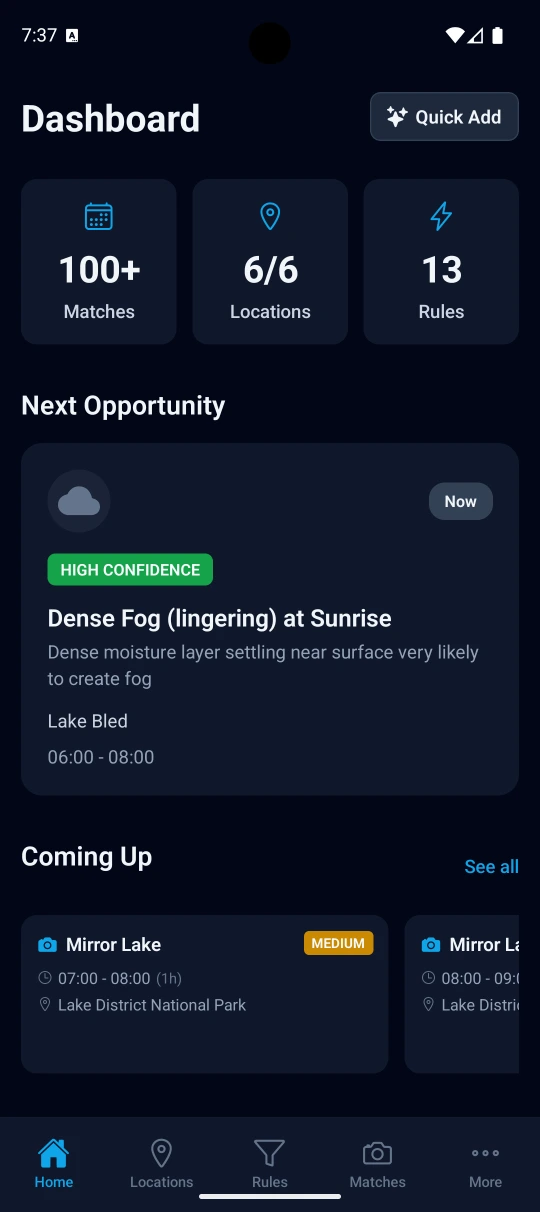
View All Your Opportunities
See upcoming and active photography opportunities based on your rules. Each opportunity shows:
- When conditions will match
- How long the opportunity lasts
- Which rule triggered the alert
- Confidence score and evidence (Event Intelligence)
- Location details
Full Rule Management
The iOS app includes the complete rule builder introduced in January:
- Create new rules from scratch
- Browse and apply templates (fog, aurora, golden hour, etc.)
- Edit existing rules with the mobile-optimized interface
- Use all available weather fields
- Set time windows and notification preferences
- Group conditions with AND/OR/NOT logic
Your rules read like plain English sentences, with color-coded fields, values, and temporal modifiers for easy scanning.
Location Management
Add, edit, and remove shooting locations directly from your phone. Use the interactive map to drop pins exactly where you shoot, or search for locations by name.
Android: Now on Google Play
PhotoWeather for Android is available on Google Play. The Android app has the same core functionality as iOS: push notifications, opportunity tracking, and full rule management.
Getting Started
For Existing Users
Download the iOS app and sign in with your PhotoWeather account. All your existing rules and locations sync immediately. You can use both the web app and mobile app together—they stay in sync automatically.
For New Users
The app includes a guided onboarding flow:
- Add your shooting locations
- Select photography interests (landscapes, fog, aurora, etc.)
- Choose rule templates that match what you like to photograph
- Configure notification preferences
You’ll be set up and receiving alerts within minutes.
Download Now
PhotoWeather for iOS is available now on the App Store. The app is free to download, and all tier features (Free, Pro) work exactly as they do on the web.
Android users: Get it on Google Play →
More features are coming—weather charts, opportunity map, and more are in the pipeline. But the core experience is ready now: reliable notifications, full rule control, and fast opportunity tracking.
Questions or feedback? Reach out at support@photoweather.app.
Clear skies, Pontus