
What's New in PhotoWeather: March 2026
A new Evaluation Dashboard for Pro users, simpler rule limits, refined templates, and mobile app improvements.

What’s New in PhotoWeather: March 2026
February was focused on helping you understand how your rules actually perform, simplifying rule limits, and refining the templates that drive your alerts. Here’s what shipped.
1. Evaluation Dashboard (Pro)
This is the biggest addition this month. Pro users now have a dedicated Evaluation page that shows exactly how each rule performed — which conditions passed, which failed, and why.
Rule Breakdown
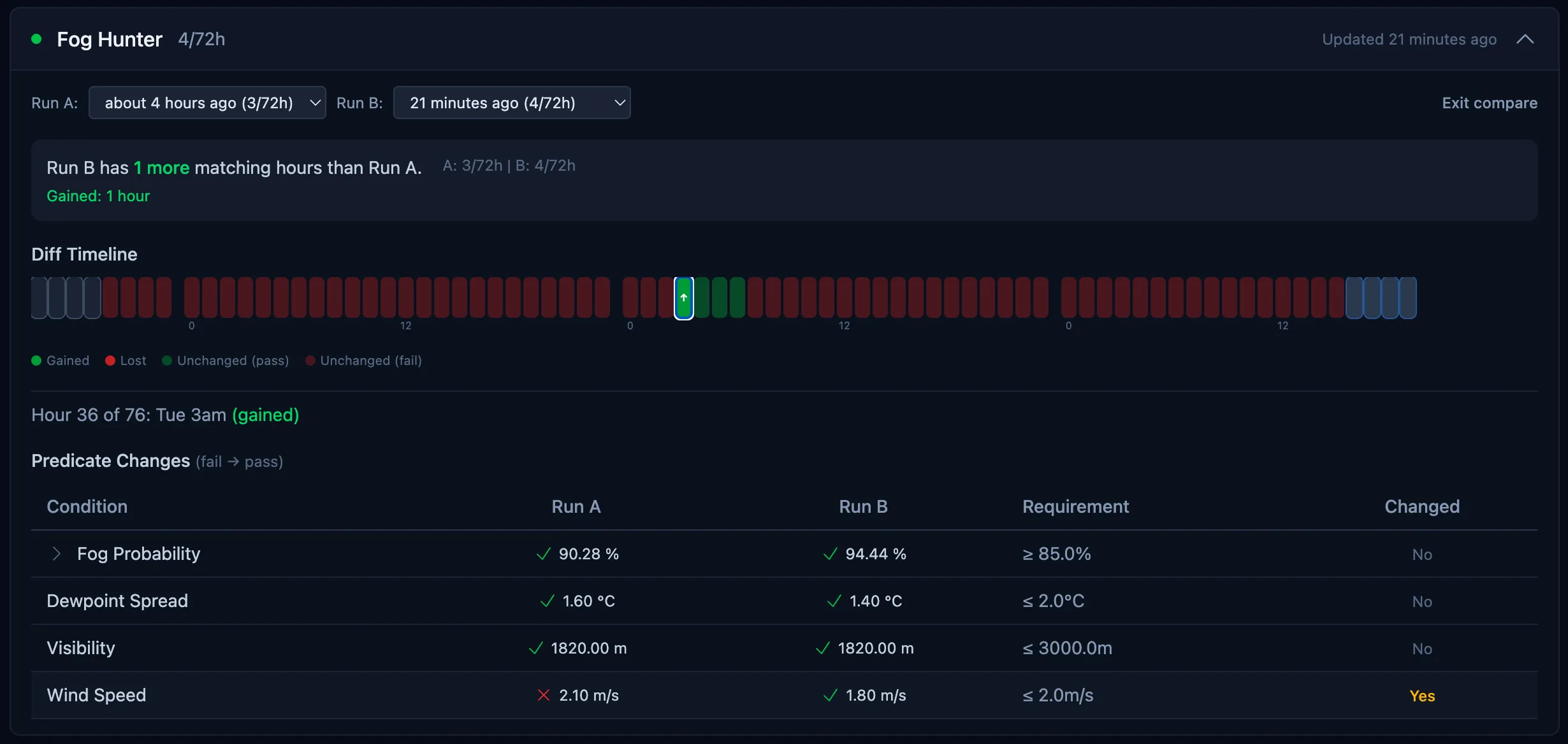
Open the Evaluation page for any rule and you’ll see a timeline of every condition, hour by hour. Each condition shows its actual value alongside the threshold you set, so you can immediately see what matched and what didn’t. Derived conditions (like Golden Hour Potential or Cloud Drama Score) also show the input values that fed into them, so you can understand what’s driving the score.
Historical Runs
Every evaluation run is now saved. Use the run selector to browse past runs and see how your rule performed on different days. This is useful for tuning thresholds — if a rule missed an opportunity you know was good, pull up that day’s evaluation and see exactly which condition was too strict.
Run Diffing
Select two runs and compare them side by side. The diff view highlights what changed between them: conditions that flipped from pass to fail, values that shifted, and time windows that moved. This is the fastest way to understand why a rule that worked last week stopped matching this week.
Match Event Overlay
When you’ve had actual opportunities fire, they appear as overlay markers on the evaluation timeline. Click any marker to see the opportunity details in a popover. This connects the evaluation data to real outcomes — you can see at a glance whether your rule’s passing windows aligned with real opportunities.
Demo Mode for Free Users
Free users can access the Evaluation page in demo mode. It uses sample data to show how the feature works, so you can explore the interface and decide if it’s worth upgrading for your own rules.
Web only (for now)
The Evaluation Dashboard is best experienced on desktop, where the data-dense timelines and side-by-side comparisons have room to breathe. It works in mobile browsers too, but a larger screen makes a real difference. We’re exploring ways to bring a tailored version to the mobile app down the line.
2. Rule Limits Simplified
Previously, rule limits counted every rule-location assignment separately. If you assigned one rule to 10 locations, that counted as 10 toward your limit. This was confusing and made the limits feel tighter than intended.
Now, limits count distinct rules only. That same rule assigned to 10 locations counts as 1. Free users still get 3 rules and Pro users get 100, but each rule can be assigned to as many of your locations as you want without eating into the limit.
To put that in perspective: a Pro user with 15 locations and 100 rules previously maxed out at 100 rule-location combinations total. Now those same 100 rules can each run at all 15 locations — up to 1,500 combinations. If you were holding back from assigning rules to multiple locations because of the limit, you no longer need to.
3. Refined Templates
Several templates received targeted improvements to reduce false alerts and catch more real opportunities.
Morning Frost & Morning Dew
The old “Dawn Crystals” template has been split into two separate templates. Morning Frost targets sub-zero conditions with ice crystal formations. Morning Dew targets above-freezing mornings with dew and soft mist. Previously, both scenarios were lumped together, which meant the template either missed frosty mornings or triggered on warm dewy ones depending on how you tuned it. Now each template is optimized for its specific conditions.
Golden Hour
The golden hour template is now more sensitive. The matching threshold has been lowered so good golden hour conditions that were previously filtered out now trigger alerts. If you felt like you were missing good sunsets, this should help.
Cloud Drama
Cloud Drama Score now correctly suppresses to zero when the sun is more than 12 degrees below the horizon. Previously, the score could remain elevated during deep twilight or nighttime, leading to alerts for skies you couldn’t actually photograph. No more “cloud drama” alerts at midnight.
Visibility Scoring
Visibility scoring has been softened across all templates that use it. The previous curve was too aggressive and filtered out conditions that were still great for photography. Golden hour and blue hour templates in particular should now catch more opportunities.
4. Mobile App Improvements
Onboarding Guide
New users opening the app for the first time now get a guided walkthrough that explains the core concepts: locations, rules, templates, and opportunities. The guide walks you through setting up your first location and rule so you start receiving alerts right away.
Aurora Travel Distance in Rule Editor
The aurora travel distance setting — previously only available on the web — is now in the mobile rule editor. Set your radius (25 km, 50 km, or 100 km) to get alerts when clear-sky aurora viewing is available within driving distance, even if your location is overcast.
Trend Change Operators
You can now use trend change operators (like “temperature dropping by 5°C in 3 hours” or “wind speed increasing trend”) directly in the mobile rule editor. These were previously web-only. This opens up the full power of change-based rules on mobile.
Select All / Deselect All
Assignment screens (assigning rules to locations and vice versa) now have Select All and Deselect All buttons. Small quality-of-life improvement when you want to assign a rule to all your locations at once.
That’s the March update. The Evaluation Dashboard gives Pro users real visibility into rule performance for the first time, and the simplified rule limits make it easier to assign rules across all your locations.
Questions or feedback? Reach out at support@photoweather.app.
Clear skies, Pontus