
What's New in PhotoWeather: January 2026
A redesigned rule builder with readable sentences, an interactive opportunity map, and one-click sharing for photography opportunities.
What’s New in PhotoWeather: January 2026
January brings a major refresh focused on making PhotoWeather easier to use. A redesigned rule builder, a new map view for opportunities, and the ability to share opportunities with anyone. Here’s what shipped.
1. Redesigned Rule Builder
The rule editor has been completely rebuilt around one simple idea: your rules should read like plain English.
How It Works
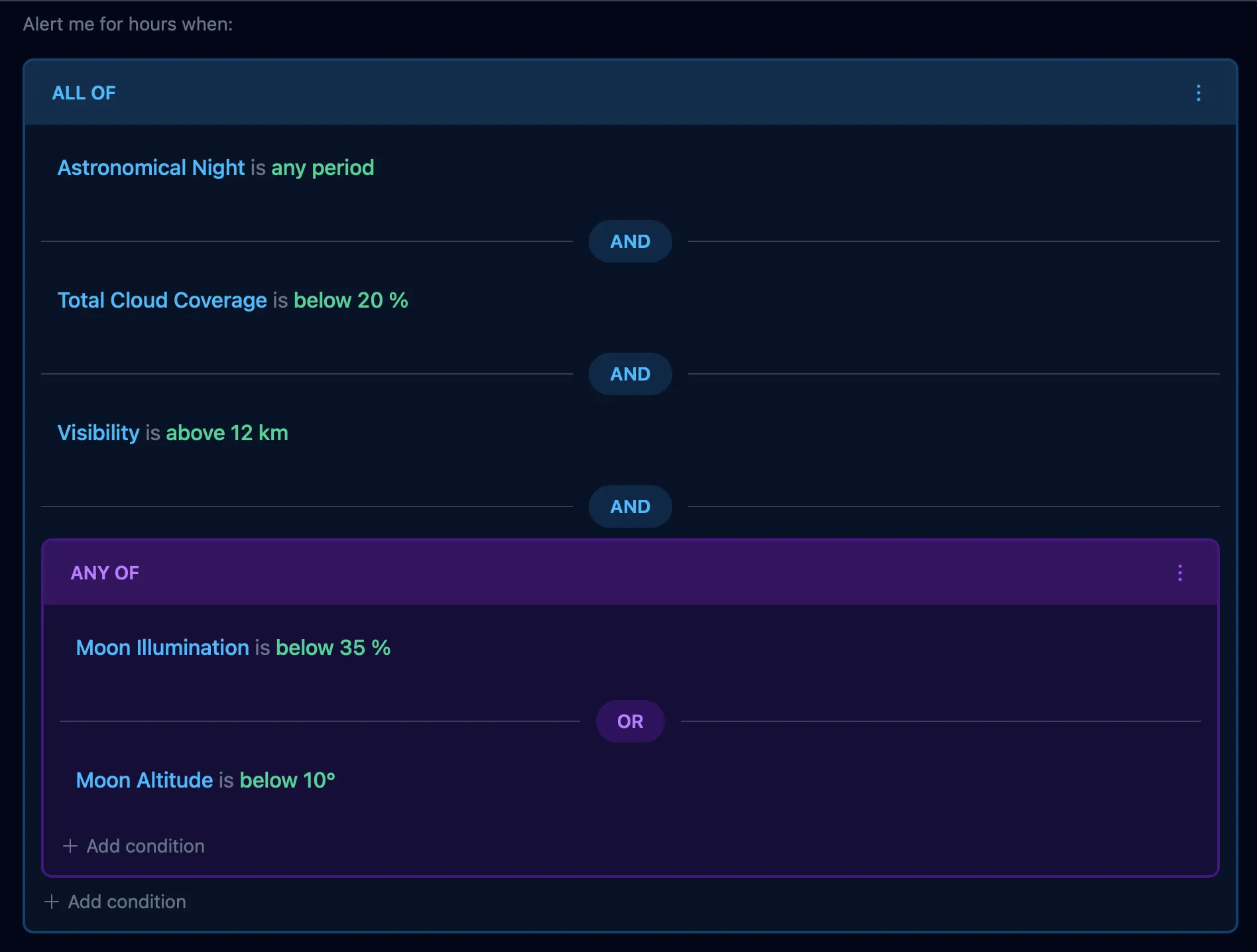
Instead of juggling dropdowns, form fields, and abstract condition widgets, you now see your conditions as complete sentences:
- “Fog is between 0m and 100m”
- “Wind speed is below 15 km/h”
- “Temperature is above -5°C”
Each part of the sentence is color-coded for quick scanning:
- Field names appear in blue
- Values and thresholds appear in green
- Temporal modifiers (like “previous 6h average” or “increasing trend”) appear in amber
Editing Inline
Tap any part of a condition to edit it. The editor opens right there in context, no page navigation required. Adjust the threshold, change the comparison mode (above/below/between), or add a temporal modifier. Hit Apply, and your change is saved.
Grouping Conditions
Combining conditions with AND/OR/NOT is clearer than before. Select multiple conditions using the checkboxes, then choose your logic operator. The grouped conditions wrap in a color-coded box:
- Blue for AND (all conditions must match)
- Purple for OR (any condition can match)
- Red for NOT (none of the conditions can match)
You can tap the group header to cycle through operators, or tap inside to add more conditions to the group.
Mobile-First Design
The entire interface was designed for mobile from the start. Groups collapse to show a summary when you’re not editing them. Touch targets are large enough for comfortable tapping. Everything works on your phone when you’re out in the field.
2. Opportunity Map View
You can now see all your photography opportunities plotted on an interactive map.
Video: Exploring opportunities on the map
At a Glance
Each of your locations appears as a marker on the map. The marker color tells you the status:
- Green = Active opportunity happening right now, with a label showing how long until it ends
- Gray = Upcoming opportunity in the forecast, with a label showing when it starts
Multiple opportunities at the same location? The marker shows the most relevant one (active takes priority, then highest confidence).
Filtering by Rule
Use the dropdown (or sidebar on desktop) to filter opportunities by a specific rule. Want to see only fog opportunities across all your locations? Select your Fog Hunter rule and the map updates instantly.
Click for Details
Click any marker to open a detail panel showing:
- Location name
- Rule that matched
- Confidence score (how certain the forecast is)
- Time information (when it starts, how long it lasts)
- Link to the full opportunity page
When to Use the Map
The map view shines when you have multiple locations and limited time. Instead of scrolling through a list, you can see at a glance where conditions are favorable and make a quick decision about where to shoot.
3. Opportunity Sharing
Want to share a photography opportunity with a friend, a client, or your photography group? Now you can.
Creating a Share Link
Click the share button on any opportunity detail page. PhotoWeather generates a unique public link that you can copy and send to anyone.
What They See
Anyone with the link can view the opportunity without logging in or creating an account. The shared view includes:
- Location and timing – Where and when the opportunity occurs
- The rule that matched – What conditions triggered the alert
- Weather analysis – The detailed forecast data
- Confidence score – How certain the prediction is
- Event Intelligence evidence – The factors driving the confidence score
It’s a complete picture of the opportunity, not just a teaser.
You Stay in Control
You can revoke any share from the opportunity page at any time, immediately disabling the public link.
Use Cases
- Professional photographers: Share opportunities with clients to explain why a specific date/time is recommended for their shoot
- Photography groups: Alert your local club to a fog or aurora opportunity without requiring everyone to have accounts
- Planning with friends: Share a weekend opportunity so everyone can see the same forecast data
4. Template Improvements
Two popular templates received important fixes this month.
Winter Wonderland
The Winter Wonderland template previously required 3 meters of snow depth to trigger. Unless you’re shooting in Antarctica or the Himalayan glaciers, this was never going to match.
The fix: Snow depth requirement reduced to 20 centimeters. Still enough for beautiful snow-covered landscapes, but actually achievable in normal winter conditions.
If you have rules using the Winter Wonderland template, you should start seeing more opportunities this winter.
Northern Lights
The Northern Lights template had an overly strict requirement for moon interference. It would only trigger when moon illumination was very low, which ruled out many nights with visible aurora.
The fix: The template now uses the aurora_quality derived field, which intelligently balances aurora activity, cloud cover, darkness, and visibility. Partial moon phases no longer block the template entirely. Strong aurora displays during a half moon will still trigger alerts.
The template still prioritizes dark skies (lower moon illumination improves the aurora quality score), but it’s no longer an all-or-nothing filter.
That’s the January update. The new rule builder and map view represent a significant step toward making PhotoWeather more intuitive, and opportunity sharing opens up new ways to use the platform with others.
Questions or feedback? Reach out at support@photoweather.app.
Clear skies, Pontus