
Multi-Location Strategies: Maximizing Your Photography Radius
One location is rarely enough. Here's how to strategically set up and manage multiple PhotoWeather locations to catch the best conditions within driving distance—without drowning in alerts.
Multi-Location Strategies: Maximizing Your Photography Radius
You get the alert. Conditions are perfect. Then you look outside and realize the weather is even better fifty kilometers away.
If you are locked to a single location, this happens constantly. A coastal sunrise might be fogged in while an inland valley is clear. A mountain peak could be above the cloud line while the lowlands are flat and gray. Elevation, distance from water, and orientation all create microclimates that a single forecast point cannot capture.
That is the entire reason PhotoWeather supports multiple locations. Free accounts start with one. Pro users get fifteen. The question is not whether you should expand beyond one spot. It is how to choose those spots so they actually give you more opportunities instead of just more noise.
Why One Location Fails
Weather models work on grid cells. A single location gives you one cell. If that cell happens to sit in a persistent microclimate, you will either miss great conditions nearby or get alerts for mediocre weather that does not represent what is actually happening around you.
Real examples:
- A coastal town stays under marine layer fog while five kilometers inland the sky is open and golden.
- A valley floor is trapped under temperature inversion and flat gray cloud while a nearby hill is poking through into dramatic light.
- A location on the lee side of a lake gets calm reflections while the windward shore is gusty and choppy.
- A south-facing slope melts frost by mid-morning while a north-facing one keeps it until afternoon.
None of this is exotic. It is normal daily variation that a single location simply cannot see.
How to Choose Locations for Weather Diversity
The goal is not to scatter pins randomly across a map. The goal is to cover different weather regimes so that when one spot is wrong, another is likely right.
Coastal plus inland
Coastal locations catch marine fog, onshore flow, and dramatic cloud buildups over water. Inland locations escape marine layers, dry out faster after rain, and often see sharper temperature swings. If you shoot seascapes, keep one coastal location. If you also shoot landscapes or forests, add something twenty to forty kilometers inland.
Valley plus elevation
Valleys collect fog, frost, and cold air. Higher elevations get different cloud patterns, earlier light, and often clearer skies above inversion layers. A single hill or mountain location can unlock entirely different conditions from what the valley reports.
North and south of home
Weather systems often move in predictable directions. A location north of your base may be ahead of a front while a southern location is still in the clearing. If you live where fronts travel west to east, adding east-west spread matters too. The point is to break the symmetry of your local geography.
Water bodies
Lakes, rivers, and coastlines create their own wind and fog patterns. A location on one side of a lake can be mirror-calm while the other side is rough. If reflections matter to you, this is not a nice-to-have. It is essential.
Location-Specific Alerts as a Decision Tool
Once you have multiple locations set up, each one gets its own rules and its own alerts. This is where the strategy pays off.
Instead of one generic “good sunrise” alert from your home town, you can build location-specific logic:
- Your coastal location watches for clearing marine fog and dramatic cloud structure over water.
- Your inland valley location watches for frost, fog, and soft overcast in forest settings.
- Your hilltop location watches for above-the-clouds light and clear skies for astrophotography.
When an alert arrives, the location name tells you immediately where to go. The rule tells you what kind of opportunity it is. That combination is what makes the alert actionable.
Managing Multiple Locations Without Alert Fatigue
More locations can mean more alerts. If you are not careful, you end up ignoring them.
Here is how to keep the signal high.
Make rules specific
A broad rule like “good light” applied to ten locations will spam you. A specific rule like “fog below one hundred meters in the valley after recent calm wind” applied to two locations will not.
The tighter your rules, the more locations you can monitor comfortably. If your rules are loose, start with fewer locations and tighten before expanding.
Use notifications per location
PhotoWeather lets you enable or disable notifications for each location independently. If you have a speculative location that you are still testing, turn off notifications and just check it manually. If you have a reliable core spot, leave notifications on. This is useful for seasonal locations too. Disable the mountain location in winter if you do not shoot there then.
Match rules to realistic travel
A location four hours away with a one-hour opportunity window is not a practical alert. Either build rules with longer windows for that location, or accept that it is a manual-check location rather than an active-alert one.
A good setup usually looks like this:
| Location type | Distance | Alert style |
|---|---|---|
| Core local | Under 30 min | Tight rules, active notifications |
| Weekend radius | 30-90 min | Moderate rules, active notifications |
| Expedition spots | 90+ min | Loose rules or manual check only |
Use the calendar for planning, not just alerts
PhotoWeather’s calendar feeds can be filtered by location. If you have a lot of locations, consider separate calendar subscriptions:
- One for your core local spots
- One for longer-drive weekend locations
- One for seasonal or speculative spots
This keeps your main calendar useful while still giving you visibility into the wider network. For a full walkthrough, see the calendar integration guide.
Pro Strategies for Larger Location Networks
If you are on Pro with fifteen locations, you have enough coverage to think strategically.
Group by purpose, not just geography
Instead of adding locations because they are interesting, assign each one a job:
- Seascape spots: 2-3 coastal locations covering different wind and tide exposures
- Forest and fog: 2-3 inland valleys or lowlands where fog and frost form reliably
- Elevation and sky: 2-3 hill or mountain locations for above-the-clouds and astro work
- Urban or architecture: 1-2 city locations for after-rain reflections and street light
- Seasonal reserves: 2-3 spots you only activate during specific seasons
This turns your network from a random collection into a system where each location covers a gap the others do not.
Rotate seasonally
You do not need all fifteen locations active year-round. A mountain pass that is accessible in summer may be irrelevant in deep winter. A lake that freezes may become a winter foreground spot instead of a reflection location. A coastal area that is crowded in summer may become your main spot in autumn.
Deactivate notifications for out-of-season locations. Rename them if it helps you remember their seasonal role. The goal is to keep the active set small enough that you still trust every alert.
Use the opportunity map to read your whole network
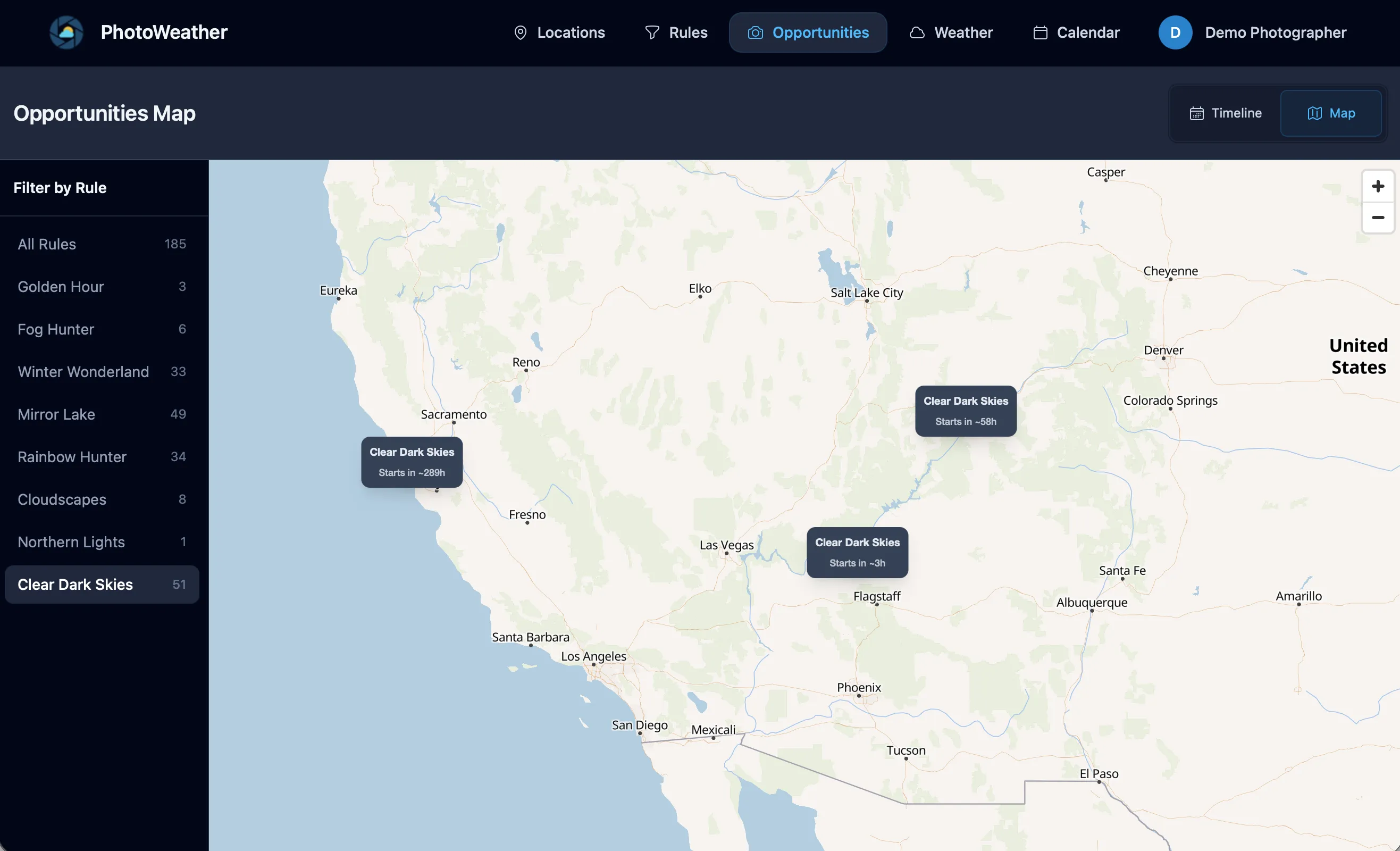
The PhotoWeather opportunity map shows all your locations at once. Green markers mean an active opportunity is happening right now. Gray markers mean something is coming up. You can filter by rule to see only fog opportunities, or only clearing storm alerts, across your entire network.
This is the fastest way to answer the question: “If I leave now, where should I go?”
When you open the map, you are not reading forecasts. You are reading decisions. The map does the work of checking fifteen locations so you do not have to.
A Concrete Example: Five-Location Seascape Network
Here is how a seascape photographer might build a small but effective network.
Location 1: Home coast, west facing Job: Default sunset spot. Rules watch for fire sky potential, low wind, and good visibility.
Location 2: Same coastline, north facing Job: Different wave angle and wind exposure. Rules watch for dramatic clouds and onshore wind for wave action.
Location 3: Inland estuary, twenty minutes away Job: Mirror reflections when the coast is too rough. Rules watch for low wind and high humidity after rain.
Location 4: Elevated cliff, forty minutes south Job: Above-the-clouds and layered fog. Rules watch for low cloud base and clearing skies.
Location 5: Exposed headland, ninety minutes away Job: Big storm seascapes. Rules are looser because travel is longer. Manual check most of the time. Active notifications only for exceptional conditions.
This network gives five different weather regimes, five different compositions, and a realistic alert load because each rule is specific to what that location actually does well.
Another Example: Landscape Photographer with Mixed Terrain
Location 1: Local forest valley Job: Fog and frost. Tight rules for morning fog probability and low wind.
Location 2: Nearby lake Job: Reflections at sunrise and sunset. Rules for calm wind and interesting sky.
Location 3: Hilltop twenty minutes away Job: Above-the-clouds inversions and layered landscape views. Rules for low cloud base and sunrise timing.
Location 4: Coastal spot for mixed trips Job: Clearing storms and dramatic skies. Only active in autumn and winter.
Location 5: Higher mountain area Job: Snow line and alpine light. Only active when freezing levels drop low enough to be practical.
With this setup, a typical week might produce two or three alerts from different locations. Each one is worth considering because the rules are tight and the locations cover genuinely different conditions.
What the Opportunity Map Shows You
If you have not used the opportunity map yet, it is worth a few minutes to understand what it does.
Each of your locations appears as a marker. The color tells you the status:
- Green = an opportunity is active right now
- Gray = an upcoming opportunity is in the forecast
Click a marker and you see the location name, the matching rule, the confidence score, and the timing. You can filter the whole map by a specific rule. Want to see only fog opportunities across all locations? Select your fog rule and the map updates.
The map is especially useful on mornings when you wake up unsure whether to go out. Instead of checking forecasts one by one, you look at the map and see whether anything green is worth the drive.
Start Small, Then Expand
You do not need fifteen locations on day one.
A better path:
- Start with two or three locations that cover genuinely different weather regimes.
- Build tight rules for each one before adding more.
- Use the opportunity map for a week to see how the alerts overlap and compete.
- Add locations one at a time when you notice a gap. If you keep missing fog because your existing spots are too elevated, add a valley. If you keep missing coastal storms because your inland spots do not see them, add a coast.
- Review and prune every season. A location that never produces alerts is either too strictly ruled or in the wrong place.
The best multi-location setup is not the biggest. It is the one where every location earns its place by giving you opportunities you would not have seen otherwise.
Quick Checklist
- Do your locations cover different elevations, distances from water, or orientations?
- Are your rules tight enough that alerts from ten locations would still be manageable?
- Have you disabled notifications for out-of-season or speculative spots?
- Are you using the opportunity map to make same-day decisions?
- Do your calendar feeds reflect realistic planning zones, or is everything in one noisy stream?
If you are still on one location, upgrade to Pro and add two carefully chosen spots. That alone will change how often you catch good conditions. Everything after that is refinement.